Final call for flight-day stress.

Did the gate change? Is your plane late? Which carousel gets your bag? Fly to Flight tracks it all for you and tells you the moment it matters.

Download on the
App Store
On the App Store for iPhone. The app requires a yearly subscription.
No sign-up, no email
Ad-free
English & Turkish
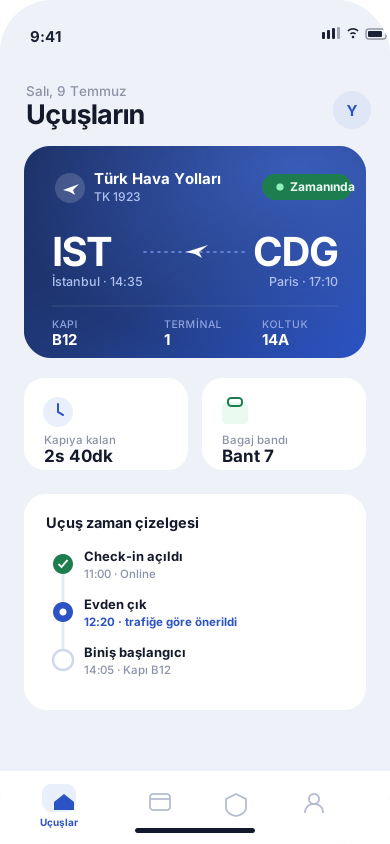
Fly to Flight home screen with an upcoming flight, live status and timeline
What it does

One step ahead,
from check-in to carousel.

Add your flight number and let go. Fly to Flight watches your flight through live sources and alerts you only when it truly matters.

Real-time alerts

Gate assignments, gate changes, delays, cancellations and baggage carousels — pushed the moment they change, before the announcement.

Connection intelligence

Your layover, terminal change and the real delay are weighed together, so you know your make-or-miss risk before you land.

Passenger-rights assistant

Delayed or cancelled? See exactly what you're owed and send a pre-filled claim letter to the airline in one tap.

Baggage rules

Cabin and checked allowances for your airline and fare class — pack right and skip excess-baggage surprises.

Encrypted document wallet

Passport, visa and insurance summaries are stored encrypted. When your passport drops below six months of validity the wallet warns you — many countries refuse anything less.

Your flight log

Your routes, airlines and countries add up on their own: how many flights, how many airports, how many kilometres — your year in review writes itself.

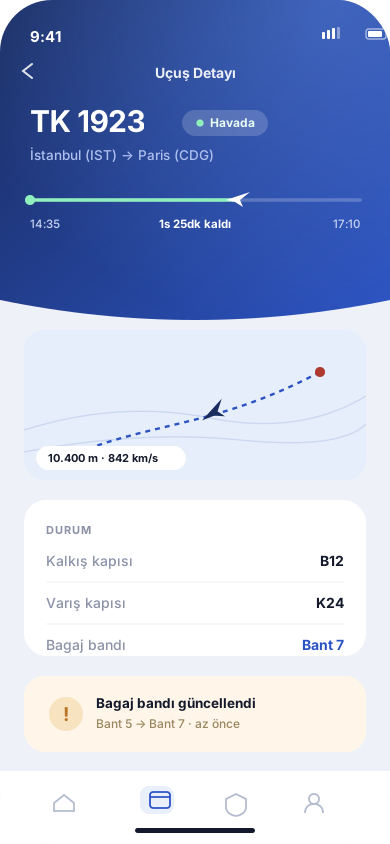
Live tracking

Where's your plane, which gate — one screen.

Departure and arrival times, gate and terminal, delay status and your aircraft's live position, all on one card. No more hunting for airport screens.

  • Notified the moment a gate or carousel is assigned
  • Delay estimates updated from real data
  • Live position, altitude and speed while your aircraft is airborne
Flight detail screen with live status, gate and timeline
Flight day

"When should I leave home?" Solved.

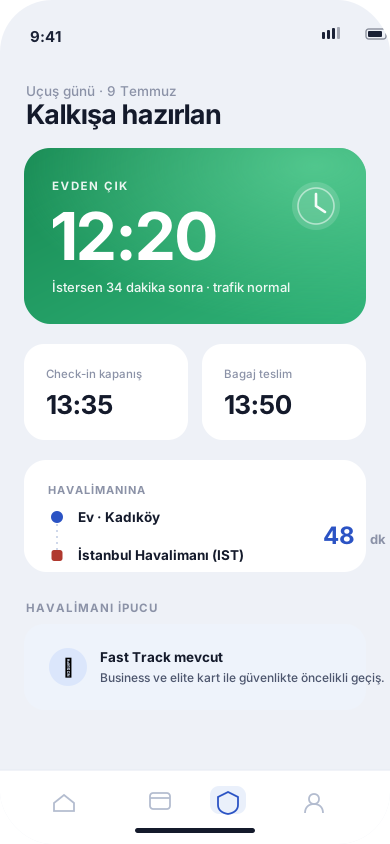
Traffic and your flight's live status are weighed together into a personal "leave now". Never hours too early, never cutting it close.

  • A personal departure time based on traffic
  • Countdowns to check-in and bag-drop close
  • Airport tips and country rules built in
Departure screen with leave-home time and flight-day plan
Know your rights

The delay isn't your fault. Your compensation is calculated.

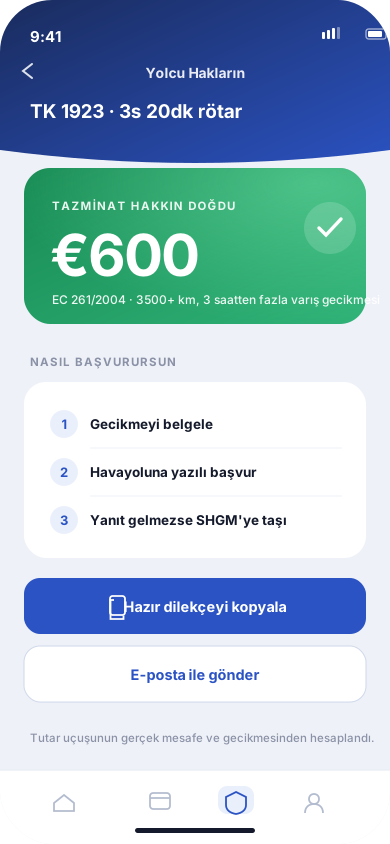
Your case is assessed against SHY-Passenger, EC 261 and the Montreal Convention: if you're owed money the amount is shown, and a claim letter pre-filled with your flight details is ready to send.

  • Compensation computed for your flight, not a guess
  • Copy-and-send claim letter
  • Step-by-step playbooks for baggage issues and cancellations
Passenger rights screen with compensation amount and claim steps
Going abroad

Visa, exit tax, customs. One answer.

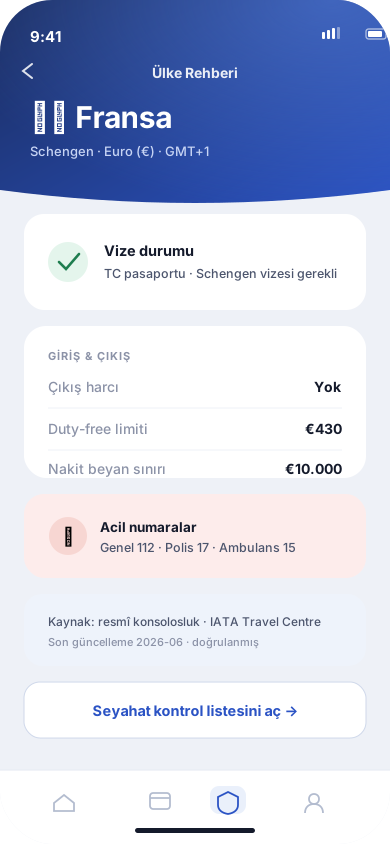
Your destination's visa requirements, exit-tax payment steps and customs limits, curated and sourced inside the app. No forum threads needed.

  • Visa requirements for your passport
  • Exit taxes and how to pay them
  • Destination basics and emergency numbers
Country guide screen with visa, exit tax and customs info

No account. No email. No tracking.

You never sign up for Fly to Flight; we don't ask for your name, email or phone number. Your documents are stored encrypted. Your location is read only while you are using the app, and only to work out your leave-home time and local weather — no location history is kept. Export or erase all of your data any time, right from Settings. Details: Privacy Policy.

Good to know

Frequently asked questions

Where can I download it?

On the App Store for iPhone. An Android version is on our roadmap.

Is it paid?

Yes. Fly to Flight runs on a yearly subscription: $3.99 / year (the App Store shows it in your local currency). There is no free tier; one subscription unlocks the whole app — no per-feature upsells, no ads, no other in-app purchases.

The subscription renews automatically through your App Store account. It renews at the same price unless you cancel at least 24 hours before the period ends; you can cancel any time under App Store → your account → Subscriptions, and you don't need to tell us. Refunds are handled by Apple. Details: Terms of Use.

Which airlines and flights are supported?

Most scheduled flights worldwide. Just add your flight number (e.g. TK1923) and departure, arrival, gate and baggage details come in automatically.

Is the compensation figure really specific to my flight?

Yes. It's computed from your flight's actual distance and arrival delay under the applicable rules (SHY-Passenger, EC 261, Montreal). If you're not owed anything, we say so; we never show a right that doesn't exist.

What happens to my data?

Your account is anonymous: we don't know who you are. Flights are stored to provide the service, documents are encrypted, and nothing is ever sold or used for advertising. Export or delete everything from Settings in one tap. See account deletion and the privacy policy.

Does it work offline?

Your flight plan, documents and guides are stored on the device and available in airplane mode. Live status updates need a connection.
Ready?

Have it with you on your next flight.

Fly to Flight is on the App Store. The app runs on a yearly subscription — $3.99/year, ad-free, no account.